✦ Now available for Chrome

Forge scroll-stopping social posts in seconds

Drop in an image, a rough idea, or raw notes. Social Post Forge turns it into polished, engaging posts — using your choice of AI, your own prompts, and proven persuasion frameworks.

No signup. No servers. Your data stays on your device.

Social Post Forge side panel showing input and generated post variants
✦ 3 styles at once
🔌 4 AI providers

Works with your favorite AI providers

OpenAI Claude Ollama ZenMux
Features

Everything you need to post consistently

Built for founders, marketers, and creators who want quality drafts without the blank-page paralysis.

🖼

Image or text input

Drop a screenshot, chart, or photo — or just type a rough idea. Post Forge builds a polished post either way.

🎨

Multiple styles, one click

Generate story-driven, listicle, and contrarian versions of the same post simultaneously — compare in tabs.

📜

Custom prompt library

Write and save your own prompts, or use pre-built ones grounded in persuasion frameworks like AIDA, PAS, and Cialdini's principles.

🔌

Bring your own AI

Connect OpenAI, Claude, ZenMux, or a local Ollama model. Your API keys never leave your browser.

📦

Import & export

Share your prompt library as JSON with teammates, or back it up anytime — duplicates auto-numbered, nothing overwritten.

🔒

Privacy-first

No servers, no tracking, no accounts. Everything lives in your browser's local storage.

How it works

From idea to post in three steps

01

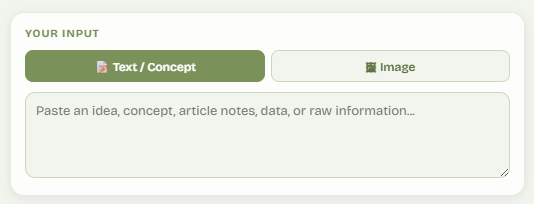
Drop in your input

Paste a concept, some notes, or drag an image straight into the side panel.

Input section of Social Post Forge showing text and image tabs
02

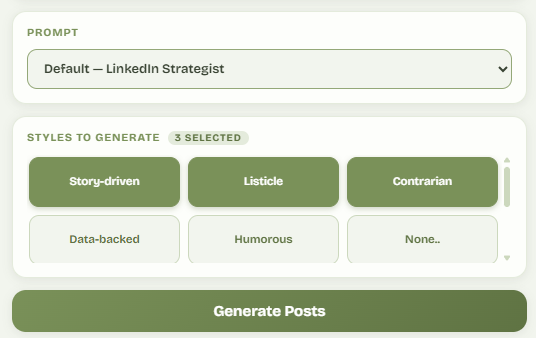
Pick a prompt and styles

Choose from your prompt library, then select up to as many style tiles as you like — story-driven, listicle, contrarian, or your own custom styles.

Prompt dropdown and style tile grid in Social Post Forge
03

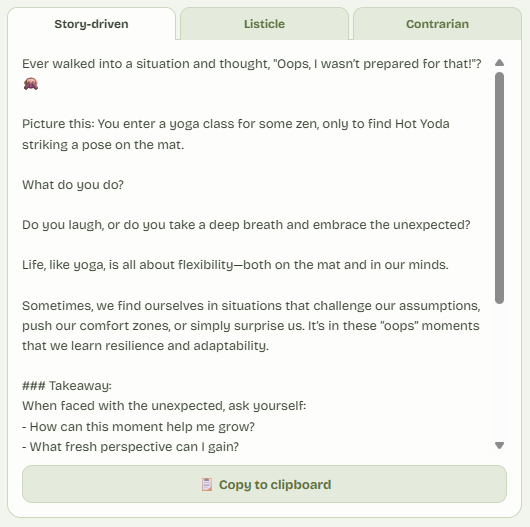
Generate, compare, copy

Every selected style renders in its own tab. Read them side by side and copy the one that hits hardest.

Generated post results shown in tabs with copy button
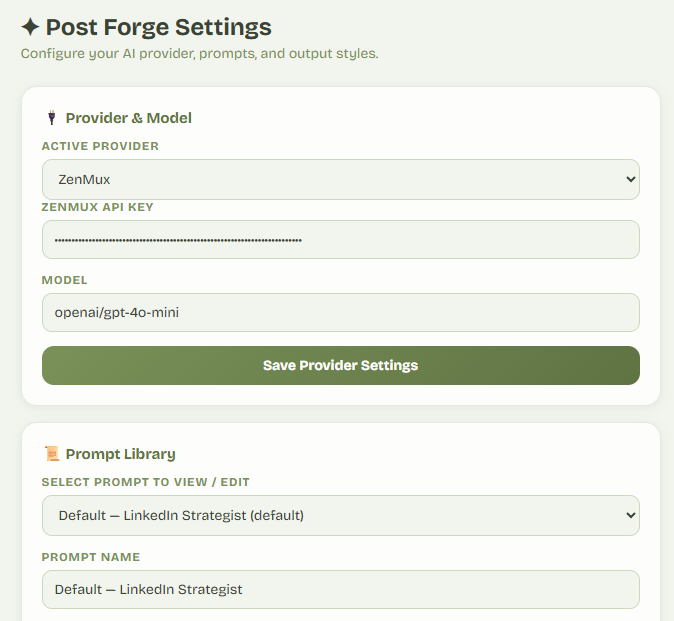
Prompt Library

Built on proven persuasion frameworks

Comes pre-loaded with prompts engineered around established psychology and copywriting principles — or write your own.

Cialdini's 6 Principles
AIDA Framework
Pain-Agitate-Solve
StoryBrand
Loss Aversion
Social Proof
Curiosity Gap
Reciprocity-First
Contrast Principle
Authority Signal
Zeigarnik Effect
Identity Framing
Settings page showing prompt library editor
How to… add more prompts and writing styles Open guide

Import the ready-made prompt and style pack

Click here to download the JSON file, then open Social Post Forge and follow these steps:

  1. 1
    Open Settings

    Launch the extension and select the Settings or gear icon.

  2. 2
    Choose “Import JSON file”

    Find the import option inside the prompt and style library settings.

  3. 3
    Select the downloaded JSON

    Choose social-post-forge-prompts-styles.json from your Downloads folder.

  4. 4
    Review the new library items

    The imported prompts and styles will be available for your next generation.

Social Post ForgeSettings
AI ProviderPrompt LibraryStyles
Prompt & Style Library
Import a shared library
Select social-post-forge-prompts-styles.json
Local AI setup

Allow Social Post Forge to connect to Ollama

Set OLLAMA_ORIGINS to allow browser-extension requests, then restart Ollama. Choose your operating system and the scope you need.

⚠️ Important: Using OLLAMA_ORIGINS=* is fine for testing, but read this before using it long-term.

Using * allows requests from any origin. It's the quickest option for local testing and getting started. For better security, configure Ollama to allow only your Chrome extension.

Find your Chrome Extension Origin
  1. Open chrome://extensions
  2. Enable Developer mode
  3. Select Social Post Forge
  4. Copy the Extension ID

Your origin will look like:

chrome-extension://YOUR_EXTENSION_ID

Then configure:

OLLAMA_ORIGINS=chrome-extension://YOUR_EXTENSION_ID

Restricting Ollama to your extension provides significantly better security than allowing every origin.

Windows

PowerShell

Temporary — current session
$env:OLLAMA_ORIGINS="*"

Applies only to the current PowerShell window.

Permanent — current user
[Environment]::SetEnvironmentVariable("OLLAMA_ORIGINS", "*", "User")

Open a new terminal and restart Ollama after running this.

Permanent — everyone
[Environment]::SetEnvironmentVariable("OLLAMA_ORIGINS", "*", "Machine")

Run PowerShell as Administrator. This applies system-wide.

macOS

Terminal

Temporary — current session
export OLLAMA_ORIGINS="*"
Permanent — current user
echo 'export OLLAMA_ORIGINS="*"' >> ~/.zshrc
source ~/.zshrc

For Bash, replace ~/.zshrc with ~/.bash_profile.

Permanent — everyone
echo 'export OLLAMA_ORIGINS="*"' | sudo tee -a /etc/zprofile

Requires an administrator password and affects login shells for all users.

Linux

Bash / systemd

Temporary — current session
export OLLAMA_ORIGINS="*"
Permanent — current user
echo 'export OLLAMA_ORIGINS="*"' >> ~/.bashrc
source ~/.bashrc
Permanent — system service
sudo systemctl edit ollama

Add the following lines in the editor:

[Service]
Environment="OLLAMA_ORIGINS=*"
Apply the change
sudo systemctl daemon-reload
sudo systemctl restart ollama
Final step: Fully quit and restart Ollama after changing a permanent environment variable. A terminal that was already open may still contain the old environment.
4 AI providers supported
12+ Persuasion-based prompts included
0 Servers — 100% local storage
Custom prompts & styles you can add
FAQ

Good to know

Do I need my own API key?

Yes — Social Post Forge connects directly to the AI provider you choose (OpenAI, Claude, ZenMux, or a local Ollama instance) using your own API key. This keeps costs transparent and your data private — nothing routes through our servers because we don't have any.

Is my data stored anywhere?

Everything — API keys, prompts, styles, and generated content — is stored locally in your browser using Chrome's storage API. It never touches an external server owned by us.

Can I use this for platforms other than LinkedIn?

Absolutely. While the prompt library ships tuned for professional social content, every prompt is fully editable — adjust tone, length, and structure for X, Instagram captions, Threads, or anywhere else you post.

What if I don't have an OpenAI or Claude subscription?

Use Ollama — it runs AI models locally on your machine for free, with no API key required. Great for testing before committing to a paid provider.

Can I share my custom prompts with my team?

Yes — export your prompt library as a JSON file and share it. When teammates import it, duplicate names are automatically numbered instead of overwritten, so nothing is ever lost.

Start forging better posts today

Free to install. Bring your own AI provider. No account required.

⬇ Add to Chrome — Free

Available on the Chrome Web Store